Responsive App & Web Design (Figma)
2024. 11. 13.
Figma

Hyunyoung Kim
Founder of Sphere D, a design and strategy studio analyzing global tech trends and product positioning.
Figma is a cloud-based UX/UI design tool that maximizes designers’ productivity through real-time collaboration, vector-based workflows, design system management, and platform independence.
With its responsive design capabilities, designers can easily create layouts optimized for a wide range of devices. When combined with frontend knowledge such as HTML and CSS, Figma enables an even higher level of precision and completeness—bridging design and implementation with greater efficiency.
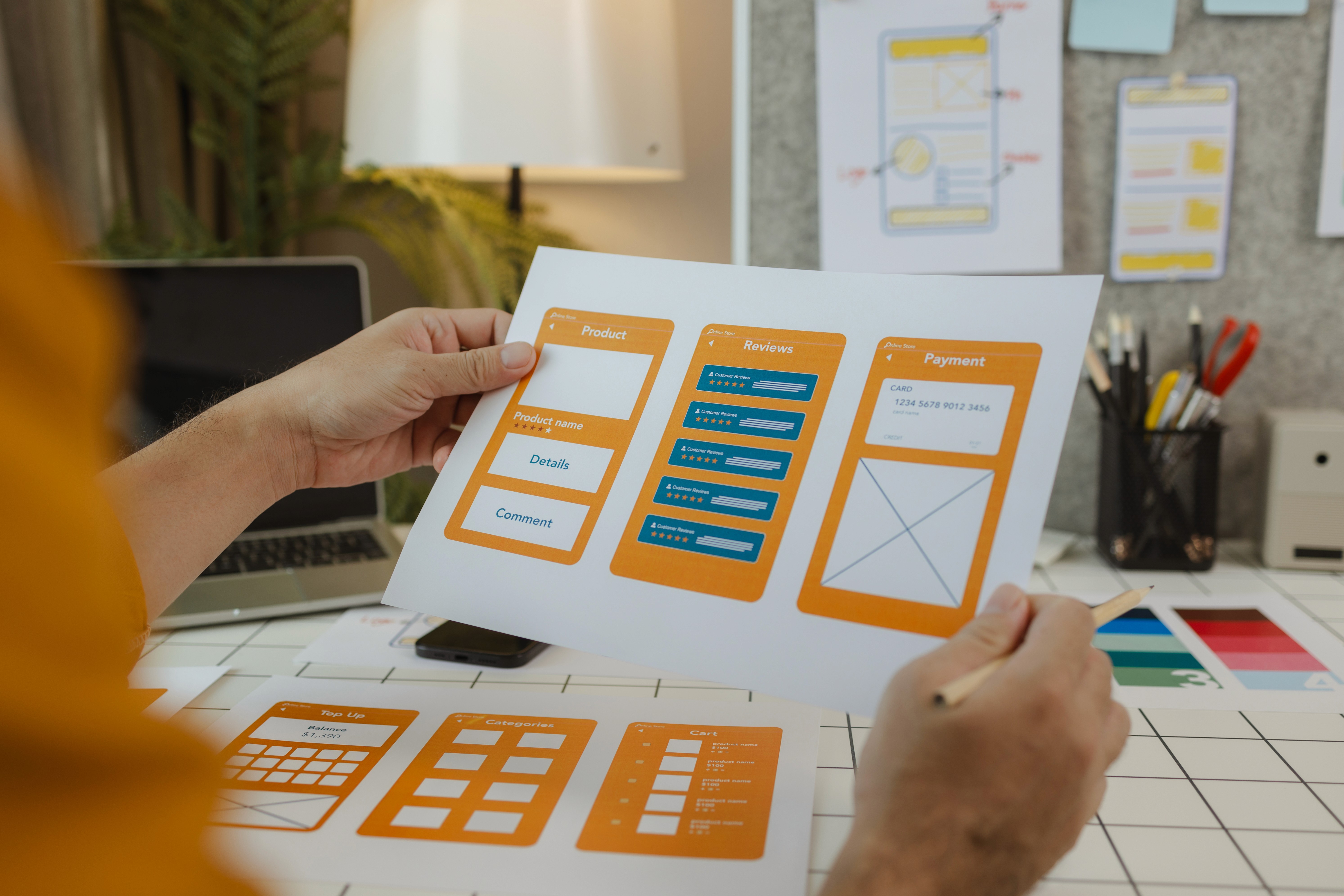
How are you using Figma?
I originally worked in graphic design using Adobe Illustrator. When I started designing apps and discovered Figma, it felt like entering a completely new world. Figma is a tool that allows designers to work far more efficiently. Features such as styles, components, auto layout, and variants significantly reduce repetitive tasks, and the tool continues to evolve quickly in response to user needs.
Key Features of Figma
Figma offers a wide range of capabilities that help designers work more effectively.
Real-time collaboration
Figma allows multiple designers to work simultaneously and exchange feedback in real time. This makes communication seamless and helps teams maintain a smooth workflow. Compared to other web design tools, this real-time collaboration dramatically improves teamwork efficiency.
Vector-based design
As a vector-based tool, Figma maintains high visual quality while allowing elements to scale freely. This makes it easy to design layouts that adapt to different devices. Design elements can also be reused and modified with ease, further improving productivity.
Platform and device simulation
Figma provides preview and simulation features that show how designs will appear on real platforms and devices. Designers can experience the interface in context and make adjustments early, helping catch issues before they become problems later in the process.
Design system management
Figma makes it easy to build and manage design systems. By using shared components and guidelines, teams can maintain visual consistency while reusing assets efficiently—resulting in both better design quality and faster workflows.
Platform-independent
Because Figma is web-based, it works across operating systems such as Windows, macOS, and Linux. Designs are stored in the cloud, allowing designers to access and continue their work from anywhere.
What Is Responsive Design?
Responsive design is a technique where layouts automatically adapt based on screen size and resolution. For example, a layout designed for an iPhone X can be adjusted to an iPhone 14 Pro in seconds. When implemented in Figma, responsive design makes it easier to create experiences optimized for a wide range of devices—improving efficiency and making collaboration with developers smoother.
Frontend Knowledge Recommended for Responsive Design
HTML & CSS
Basic knowledge of HTML and CSS is essential for understanding responsive web design. HTML defines structure, while CSS handles layout and styling.
Media Queries
Media queries allow different styles to be applied depending on device type or viewport size. They are fundamental to implementing responsive behavior across screens.
Flexbox & CSS Grid
Flexbox and CSS Grid are powerful layout systems in CSS. Flexbox is ideal for one-dimensional layouts, while CSS Grid enables more complex, grid-based structures. Together, they form the backbone of modern responsive layouts.
JavaScript
JavaScript enables dynamic behavior and user interaction. In responsive environments, it can be used to respond to viewport changes or enhance interactions based on device conditions.
Web performance optimization
Because responsive websites must perform well across many devices, optimization is critical. Skills such as image optimization, CSS and JavaScript minification, and load-time improvements are especially important.
While learning all of these development skills is valuable, time is often limited—especially when designers already need to focus on user experience and visual quality. For that reason, I recommend experimenting with Bubble, a no-code tool that lets you build real products while developing a practical sense of frontend behavior—without needing to write everything from scratch.
Sphere D.
Contact.
contact@sphered.kr
+82 70-8098-0775
Location.
Seoul, Korea
Toronto, Canada
Services.
Works.
Copyright © 2025 Sphere D. All rights reserved.
Sphere D | CEO: Hyunyoung Kim | Business Registration No.: 330-33-01418
E-commerce Registration No.: 2025-Seoul Seocho-0075
Address: 11F, 17, Seocho-daero 77-gil, Seocho-gu, Seoul, Republic of Korea