Essential Apple Design Resources for App Design in Figma
2024. 12. 4.
Figma

Hyunyoung Kim
Founder of Sphere D, a design and strategy studio analyzing global tech trends and product positioning.
Using Apple Design Resources in Figma allows designers to quickly apply essential UI elements—such as buttons, menus, and keyboards—when designing iOS and iPadOS apps. This significantly reduces production time while increasing overall design quality.
Because these resources are built in alignment with Apple’s Human Interface Guidelines, they help maintain visual consistency across screens and also serve as a practical learning reference for iOS design standards.
The resources are available for free through Figma Community and Apple Developer, making them an essential toolkit for anyone designing Apple-platform apps in Figma.

When working on app design in Figma, designers often turn to external resources to improve efficiency. This is especially true when designing for Apple devices such as iPhone and iPad—where Apple’s official design resources can make a significant difference. Below is a guide on how to use Apple Design Resources to shorten production time and create more refined, platform-accurate results.
What Are Apple Design Resources?
Apple Design Resources are official Figma files that include the core UI elements used across Apple devices. These resources contain a wide range of components—buttons, lists, menus, navigation bars, keyboards, controls, alerts, and more.
They are built specifically for Apple platforms such as iOS, iPadOS, and macOS, and are aligned with Apple’s Human Interface Guidelines. Creating these elements from scratch can be time-consuming, but using Apple Design Resources allows designers to work faster while staying true to Apple’s design standards.
Key Benefits of Apple Design Resources
Increased efficiency
Pre-built components eliminate repetitive work and significantly reduce design time.
Consistency and quality
Because the components follow Apple’s official guidelines, they help maintain visual consistency and elevate the overall polish of the app.
A learning reference
By studying Apple’s component structure and system logic, designers can gain deeper insight into high-quality UI/UX design practices.
How to Download Apple Design Resources
1. Find resources in the Figma Community
In the Figma Community, you can find Apple Design Resources organized by device and OS version, such as iOS 17.
Simply open the resource file and apply the components directly to your project.
2. Use Apple’s official design system from Apple Developer
Apple’s Developer website provides full design systems for iOS, iPadOS, and macOS.
Along with downloadable resources, you can also review the Human Interface Guidelines—making it easier to design interfaces that respect platform-specific behaviors and conventions.
Tips for Using Apple Design Resources Effectively
Customize components to fit your brand
Start with Apple’s base components, then adjust colors, typography, and spacing to align with your brand identity.
Use them as a learning tool
Study how Apple structures its UI components to improve precision, usability, and layout decisions in your own designs.
Enhance prototyping
High-fidelity prototypes built with Apple’s native components make collaboration with developers smoother and reduce implementation gaps.
Who Should Use Apple Design Resources?
Designers new to iPhone or iPad app design
Apple resources provide a reliable starting point—even for beginners.UX/UI designers who value consistency
Following Apple’s guidelines helps produce professional, high-quality interfaces.Designers who need speed and efficiency
Reduce repetitive work and shorten project timelines without sacrificing quality.
Apple Design Resources are one of the most effective tools available to Figma users—offering efficiency, consistency, and educational value in one package. Download the resources and start building better, more polished Apple-platform apps with confidence.
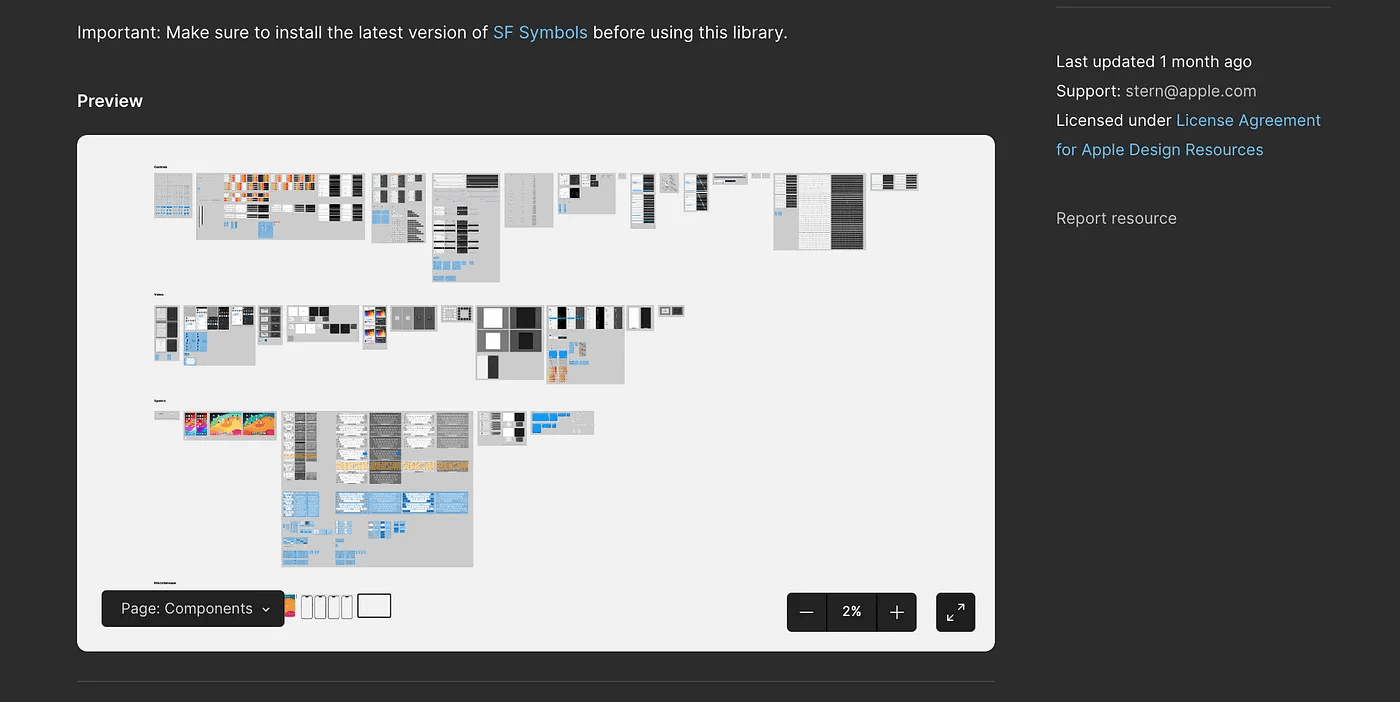
<https://www.figma.com/community/file/1248375255495415511>

<https://www.figma.com/community/file/1248375255495415511>
Sphere D.
Contact.
contact@sphered.kr
+82 70-8098-0775
Location.
Seoul, Korea
Toronto, Canada
Services.
Works.
Copyright © 2025 Sphere D. All rights reserved.
Sphere D | CEO: Hyunyoung Kim | Business Registration No.: 330-33-01418
E-commerce Registration No.: 2025-Seoul Seocho-0075
Address: 11F, 17, Seocho-daero 77-gil, Seocho-gu, Seoul, Republic of Korea